
To post a blog:
Register to blog HERE.
Once registered, log-in to post at herewomentalk.com/wp-admin.
- A new window will open that says “Add New Post”
- Enter Title
- Beneath that, add your content
- IMPORTANT: On right side of screen, choose category where your post should appear (otherwise it’ll post under “miscellaneous,” making it hard to find). Please, LIMIT: 3 Categories
- Lower right side, under “Post Tags”, type in key words (to help search engines find your post). Separate key words with commas.
- Upper right side, in the “Publish” section, choose
Save Draft, or
Preview, or
Submit for Review
To insert the featured image (Authors can add images; contributors won’t see this option. If you want author status, please email [email protected].)
- When you add a post, directly under the “Enter title here” box, you’ll see the words “Upload/Insert” and to the right of those words you’ll see a little rectangular box. When you put your mouse over that box, it says, “Add an image.”
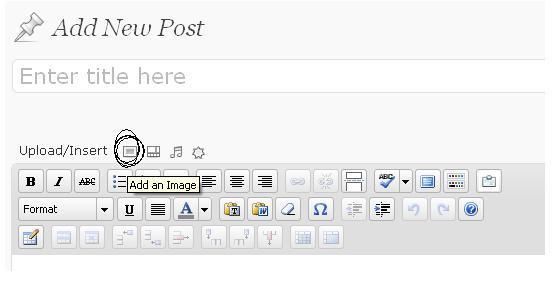
- Click on that rectangular box (as shown circled in the above image)
- A new window opens up that says, “Add an image.” And below that it says “From Computer …From URL … Media Library”
- Choose your source for your photo or Click on Media Library
- Choose your photo
- Scroll about halfway down that window and you’ll see
- Alignment
- Then
- Size … and to the right you’ll see: Use as featured image
- Click on Use as featured image
- Then scroll to the bottom and click on Save all Changes
For more detailed instructions,
HERE you’ll find more in-depth tutorials.
Wonder how to post a video? Learn how at THIS LINK.
For basic posting instructions: